 Cloudera
Insanely Fast Audio Transcription with Cloudera Streaming Operators
Updated:
I saw Insanely Fast Whisper posted on X the other day and thought it was really cool. I bookmarked and later forked the GitHub Repo. It turns out this is a perfect integration with my RAG demo RAG with Cloudera Streaming Operators.
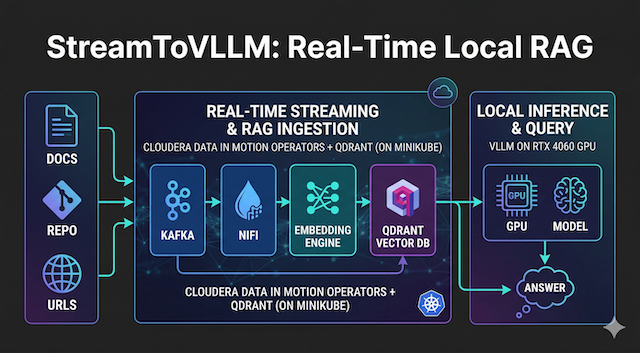
So follow along as I build StreamToWhisper — an audio ingestion layer deployed in your local Cloudera Streaming Operators stack. Audio files or live streams hit NiFi → Kafka → insanely-fast-whisper inference on the RTX 4060 → clean transcripts land in Kafka and are processed straight into your Qdrant RAG collection.
The result? You can now ask your vLLM model questions about spoken content with perfect context.
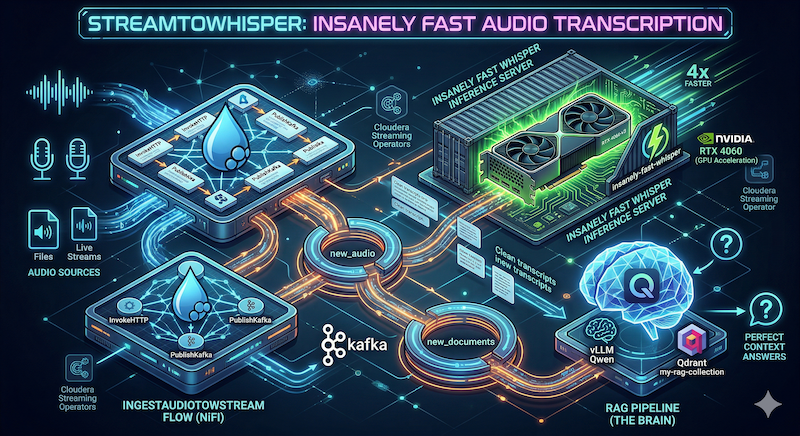
You already have the full Cloudera Streaming Operators stack + the StreamToVLLM RAG pipeline from the previous session. We’re just adding the audio transcription ability to the brain.
🚀 Let’s get started!
💻 Prerequisites
You should have:
- Minikube running with GPU passthrough (RTX 4060 confirmed)
- Cloudera Streaming Operators (CSM + CSA + CFM) installed in
cld-streamingandcfm-streaming - The full StreamToVLLM RAG stack (vLLM Qwen, Qdrant
my-rag-collection, embedding server) already deployed - NiFi UI at
https://mynifi-web.mynifi.cfm-streaming.svc.cluster.local/nifi/
📦 Step 1: Containerize & Deploy Insanely Fast Whisper Inference Server
The original repo is a fast CLI/pipeline built on openai whisper large-v3. Here we will wrap large-v3 in a lightweight FastAPI service so NiFi can call it over HTTP.
1.1 Create the Dockerfile (save as Dockerfile.whisper)
# Dockerfile.whisper.12 - Final Stable "G1" Build
# Targets: CUDA 12.4, Flash Attention 2, Whisper-Large-v3
# Author: Steven Matison (Solutions Engineer, Cloudera)

# STAGE 1: The Heavy Lifting (Builder)
FROM nvidia/cuda:12.4.1-cudnn-devel-ubuntu22.04 AS builder

ARG HF_TOKEN
ENV HF_TOKEN=${HF_TOKEN}
ENV DEBIAN_FRONTEND=noninteractive

RUN apt-get update && apt-get install -y \
    python3.11 python3.11-venv python3-pip git ffmpeg ninja-build \
    && rm -rf /var/lib/apt/lists/*

WORKDIR /app
RUN python3.11 -m venv /opt/venv
ENV PATH="/opt/venv/bin:$PATH"

# 1. Essential Build Tools for C++ Compilation
RUN pip install --no-cache-dir --upgrade pip setuptools wheel packaging

# 2. Hard-pin Torch to CUDA 12.4 (RTX 4060 Optimization)
RUN pip install --no-cache-dir \
    torch==2.4.1+cu124 torchvision==0.19.1+cu124 torchaudio==2.4.1+cu124 \
    --extra-index-url https://download.pytorch.org/whl/cu124

# 3. Web Stack (Allowing Transitive Dependencies for Starlette/Pydantic)
RUN pip install --no-cache-dir \
    fastapi uvicorn starlette pydantic pydantic-core \
    anyio idna sniffio typing-extensions click h11 python-multipart

# 4. AI Stack (Guarded with --no-deps to prevent Torch overwrites)
RUN pip install --no-cache-dir --no-deps \
    transformers insanely-fast-whisper==0.0.15 huggingface_hub

# 5. Manual AI Dependency Tree
RUN pip install --no-cache-dir \
    pyyaml requests tqdm numpy regex sentencepiece \
    httpx filelock fsspec safetensors accelerate \
    soundfile librosa scipy tokenizers

# 6. Compile Flash Attention 2 (Hardware-Specific Build)
RUN pip install --no-cache-dir flash-attn --no-build-isolation

# 7. Pre-Bake Whisper-Large-v3 (Authenticated Download)
RUN python3 -c "from transformers import pipeline; pipeline('automatic-speech-recognition', model='openai/whisper-large-v3')"

# ==========================================
# STAGE 2: The Lean Runtime
# ==========================================
FROM nvidia/cuda:12.4.1-cudnn-devel-ubuntu22.04

ENV DEBIAN_FRONTEND=noninteractive
RUN apt-get update && apt-get install -y \
    python3.11 ffmpeg \
    && rm -rf /var/lib/apt/lists/*

WORKDIR /app
COPY --from=builder /opt/venv /opt/venv
COPY --from=builder /root/.cache/huggingface /root/.cache/huggingface
ENV PATH="/opt/venv/bin:$PATH"

# FastAPI Inference Logic
COPY <<EOF /app/main.py
from fastapi import FastAPI, File, UploadFile
from fastapi.responses import JSONResponse
import torch
from transformers import pipeline
import tempfile
import os

app = FastAPI(title="StreamToWhisper")

pipe = pipeline(
    "automatic-speech-recognition",
    model="openai/whisper-large-v3",
    torch_dtype=torch.float16,
    device="cuda:0",
    model_kwargs={"attn_implementation": "flash_attention_2"}
)

@app.post("/transcribe")
async def transcribe(file: UploadFile = File(...)):
    with tempfile.NamedTemporaryFile(delete=False, suffix=".wav") as tmp:
        tmp.write(await file.read())
        tmp_path = tmp.name
    try:
        result = pipe(tmp_path, chunk_length_s=30, batch_size=24, return_timestamps=True)
        os.unlink(tmp_path)
        return {"text": result["text"]}
    except Exception as e:
        return JSONResponse(status_code=500, content={"error": str(e)})

if __name__ == "__main__":
    import uvicorn
    uvicorn.run(app, host="0.0.0.0", port=8001)
EOF

EXPOSE 8001
ENTRYPOINT ["/opt/venv/bin/python3", "main.py"]
1.2 Build & load into Minikube
eval $(minikube docker-env)
docker build -t streamwhisper:latest --build-arg HF_TOKEN=$MY_TOKEN -f Dockerfile.whisper .
 Pro Tip! To speed up build times, use your
 hf-token.
The final build output:
docker build -t streamwhisper:latest --build-arg HF_TOKEN=$MY_TOKEN -f Dockerfile.whisper .
[+] Building 373.0s (21/21) FINISHED                                                docker:default
 => [internal] load build definition from Dockerfile.whisper.12                               0.0s
 => => transferring dockerfile: 3.29kB                                                        0.0s
 => [internal] load metadata for docker.io/nvidia/cuda:12.4.1-cudnn-devel-ubuntu22.04         0.3s
 => [internal] load .dockerignore                                                             0.0s
 => => transferring context: 2B                                                               0.0s
 => CACHED [internal] preparing inline document                                               0.0s
 => [builder  1/11] FROM docker.io/nvidia/cuda:12.4.1-cudnn-devel-ubuntu22.04@sha256:622e78a  0.0s
 => CACHED [builder  2/11] RUN apt-get update && apt-get install -y     python3.11 python3.1  0.0s
 => CACHED [builder  3/11] WORKDIR /app                                                       0.0s
 => CACHED [builder  4/11] RUN python3.11 -m venv /opt/venv                                   0.0s
 => CACHED [builder  5/11] RUN pip install --no-cache-dir --upgrade pip setuptools wheel pac  0.0s
 => [builder  6/11] RUN pip install --no-cache-dir     torch==2.4.1+cu124 torchvision==0.1  170.4s
 => [builder  7/11] RUN pip install --no-cache-dir     fastapi uvicorn starlette pydantic py  3.0s
 => [builder  8/11] RUN pip install --no-cache-dir --no-deps     transformers insanely-fast-  5.3s
 => [builder  9/11] RUN pip install --no-cache-dir     pyyaml requests tqdm numpy regex sen  16.9s
 => [builder 10/11] RUN pip install --no-cache-dir flash-attn --no-build-isolation           22.9s
 => [builder 11/11] RUN python3 -c "from transformers import pipeline; pipeline('automatic-  74.1s
 => CACHED [stage-1 2/6] RUN apt-get update && apt-get install -y     python3.11 ffmpeg       0.0s
 => CACHED [stage-1 3/6] WORKDIR /app                                                         0.0s
 => [stage-1 4/6] COPY --from=builder /opt/venv /opt/venv                                    27.1s
 => [stage-1 5/6] COPY --from=builder /root/.cache/huggingface /root/.cache/huggingface       8.4s
 => [stage-1 6/6] COPY <<EOF /app/main.py                                                     0.1s
 => exporting to image                                                                       25.3s
 => => exporting layers                                                                      25.3s
 => => writing image sha256:5196a989b7101dad6a12e8a2dd01bab45fea29dccda69ded5f639c92717f2dc4  0.0s
 => => naming to docker.io/library/streamwhisper:latest                                       0.0s
1.3 Deploy YAML (save as whisper-server.yaml)
apiVersion: apps/v1
kind: Deployment
metadata:
  name: whisper-server
spec:
  replicas: 1
  selector:
    matchLabels:
      app: whisper-server
  template:
    metadata:
      labels:
        app: whisper-server
    spec:
      containers:
      - name: whisper-server
        image: streamwhisper:latest
        imagePullPolicy: Never
        resources:
          limits:
            nvidia.com/gpu: 1
            memory: "8Gi"
        ports:
        - containerPort: 8001
---
apiVersion: v1
kind: Service
metadata:
  name: whisper-service
spec:
  selector:
    app: whisper-server
  ports:
  - protocol: TCP
    port: 8001
    targetPort: 8001
  type: ClusterIP
Apply it:
kubectl apply -f whisper-server.yaml
kubectl get pods -w -l app=whisper-server
kubectl port-forward svc/whisper-service 8001:8001
Test the API (use any .wav or .mp3 file):
For my test I found the following URL to use: https://www.voiptroubleshooter.com/open_speech/american/OSR_us_000_0010_8k.wav
curl -X POST http://localhost:8001/transcribe \
  -F "file=@/path/to/your/OSR_us_000_0010_8k.wav" \
  | jq
Notice the following output:
{"text":" The birch canoe slid on the smooth planks. Glue the sheet to the dark blue background. It is easy to tell the depth of a well. These days a chicken leg is a rare dish. Rice is often served in round bowls. The juice of lemons makes fine punch. The box was thrown beside the parked truck. The hogs were fed chopped corn and garbage four hours of steady work faced us a large size in stockings is hard to sell"}
🌊 Step 2: NiFi Flows for StreamToWhisper
Download the full flows here: NiFi Templates (new StreamToWhisper and IngestDataToSTream flows added today).
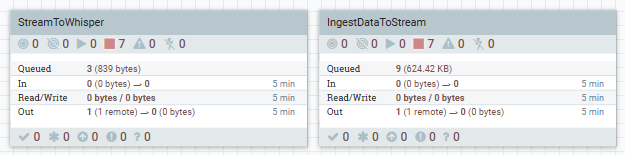
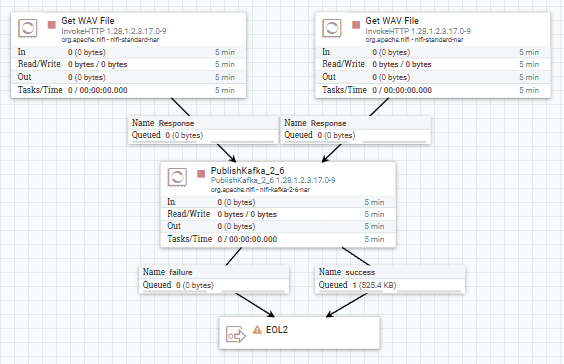
🛠️ IngestAudioToStream Flow
- GenerateFlowFile / InvokeHTTP → pulls audio from our sample URL above
- PublishKafka_2_6 → sends raw audio bytes to the Kafka topic
new_audiofor consumption
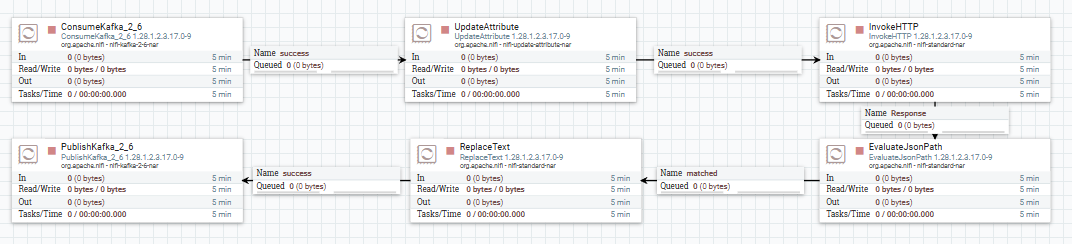
🛠️ StreamToWhisper Flow
-
ConsumeKafka_2_6 – Consumes new
new_audiotopic for incoming files -
InvokeHTTP – POST to
http://whisper-service:8001/transcribe(binary file upload) -
EvaluateJsonPath – extract
$.textinto attributetranscriptto use further - ReplaceText - format flowfile with our transcript text
-
PublishKafka_2_6 – publish to
new_documentsto process as any other document inStreamToVLLM
🌊 Step 3: Integration with Existing RAG (StreamToVLLM)
Transcripts are automatically ingested into Qdrant by the existing StreamToVLLM flow.
Now ask your vLLM model about spoken content:
python3 query-rag-whisper.py
Example question: “How is rice prepared?”
You’ll get a perfect context-aware answer pulled from the transcribed audio.
Notice the following output:
python3 query-rag-whisper.py

=== ANSWER ===
Rice is often served in round bowls. It can be prepared in various ways, such as plain, with sides like peanut sauce, or in different flavored broths. It's a staple food that is consumed by billions worldwide and has numerous cultural and culinary associations.
💻 Terminal Commands For This Session
# Build & deploy
eval $(minikube docker-env)
docker build -t streamwhisper:latest -f Dockerfile.whisper .
kubectl apply -f whisper-server.yaml

# Port forwards (add to your existing chain)
kubectl port-forward svc/whisper-service 8001:8001 &

# Check GPU usage
watch nvidia-smi

# Delete / restart
kubectl delete -f whisper-server.yaml
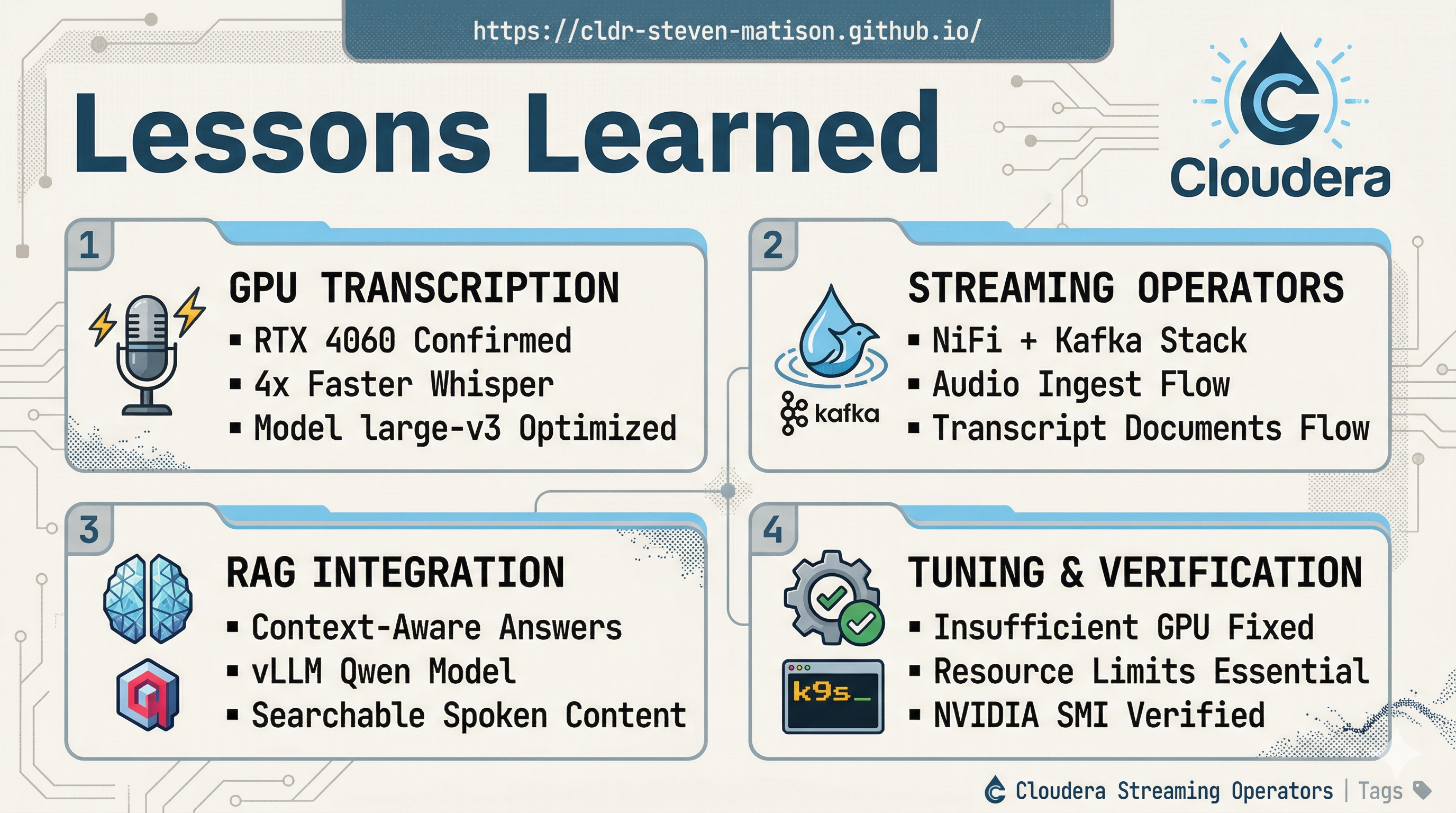
 Lessons Learned I summarized lessons learned, terminal commands, and terminal output here.
 The “StreamToWhisper” Takeaway
- Full streaming audio pipeline now lives inside your Cloudera Operators cluster.
- RTX 4060 handles large-v3 Whisper.
- Local infrastructure — NiFi + Kafka on my local minikube cluster.
- Seamless RAG integration — spoken content is now searchable and queryable exactly like your documents.
- Future-Proof — swap Whisper models, add diarization, or pipe live microphone streams via NiFi processors.
You now have a complete local AI data engineering sandbox: documents → RAG, audio → transcripts → RAG using NiFi, and Kafka deployed with Cloudera Streaming Operators.