 Cloudera
Custom NiFi Processors with Cloudera Streaming Operators
Updated:
 Danger! This is a Work in Progress article, content and code is updating frequently until this notice is removed.
Ready to take NiFi beyond the out-of-the-box components? This guide dives into the practical steps for deploying custom extensions within Cloudera Streaming Operators. We’ll explore two distinct paths for extending your data flows: rapid prototyping with Python processors and the Java/NAR approach using Nar Provider. Whether you’re generating synthetic fraud data or building complex custom logic, here is how to bring custom processors into your local development environment.
Key Highlights
-
Python Integration: Build a TransactionGenerator and learn how to mount local extensions for fast iteration.
-
Java/NAR Workflow: Use Maven archetypes to package robust processors and deploy them via a dedicated NAR Provider.
-
Kubernetes Orchestration: Configure the NiFi Custom Resource (CR) to recognize and load your custom code automatically.
-
Troubleshooting Tips: Pro-tips on logging and volume verification to ensure your processors actually show up in the UI.
Step 1: Create the TransactionGenerator Python Processor
Create the directory on your MacBook:
mkdir -p ~/nifi-custom-processors/
cd ~/nifi-custom-processors/
Create TransactionGenerator.py as follows:
# TransactionGenerator.py
from nifiapi.flowfilesource import FlowFileSource, FlowFileSourceResult
import sys
import os
import socket
import logging
import string
import datetime
import random
import uuid
import csv
import json
import math
import time
from random import randint
from random import uniform

# Add some data = Amounts and Cities.
AMOUNTS = [20, 50, 100, 200, 300, 400, 500, 10000]
CITIES = [
    {"lat": 48.8534, "lon": 2.3488, "city": "Paris"},
    {"lat": 43.2961743, "lon": 5.3699525, "city": "Marseille"},
    {"lat": 45.7578137, "lon": 4.8320114, "city": "Lyon"},
    {"lat": 50.6365654, "lon": 3.0635282, "city": "Lille"},
    {"lat": 44.841225, "lon": -0.5800364, "city": "Bordeaux"},
    {"lat": 6.5244, "lon": 3.3792, "city": "Lagos"},
    {"lat": 28.6139, "lon": 77.2090, "city": "New Delhi"}
]

class TransactionGenerator(FlowFileSource):
    class Java:
        implements = ['org.apache.nifi.python.processor.FlowFileSource']

    class ProcessorDetails:
        version = '0.0.6-SNAPSHOT'
        description = '''A Python processor that creates credit card transactions for the Fraud Demo.'''

    # Define geo functions
    def create_random_point(self, x0, y0, distance):
        r = distance/111300
        u = random.random()
        v = random.random()
        w = r * math.sqrt(u)
        t = 2 * math.pi * v
        x = w * math.cos(t)
        x1 = x / math.cos(y0)
        y = w * math.sin(t)
        return (x0+x1, y0 +y)

    def create_geopoint(self, lat, lon):
        return self.create_random_point(lat, lon, 50000)

    def get_latlon(self):
        geo = random.choice(CITIES)
        return self.create_geopoint(geo['lat'], geo['lon']),geo['city']

    def create_fintran(self):

        latlon,city = self.get_latlon()
        tsbis=(datetime.datetime.now()).strftime("%Y-%m-%d %H:%M:%S ")
        date = str(datetime.datetime.strptime(tsbis, "%Y-%m-%d %H:%M:%S "))
        fintran = {
          'ts': date,
          'account_id' : str(random.randint(1, 1000)),
          'transaction_id' : str(uuid.uuid1()),
          'amount': random.choice(AMOUNTS) + random.randint(1, 100),
          'lat' : latlon[0],
          'lon' : latlon[1]
        }
        return (fintran)

    def create_fraudtran_og(fintran):
        latlon,city = get_latlon()
        tsbis = str((datetime.datetime.now() - datetime.timedelta(seconds=random.randint(60,600))).strftime("%Y-%m-%d %H:%M:%S "))
        fraudtran = {
          'ts' : tsbis,
          'account_id' : fintran['account_id'],
          'transaction_id' : 'xxx' + str(fintran['transaction_id']),
          'amount': random.choice(AMOUNTS) + random.randint(1, 100),
          'lat' : latlon[0],
          'lon' : latlon[1]
        }
        return (fraudtran)

    def create_fraudtran(self):

        latlon,city = self.get_latlon()
        tsbis=(datetime.datetime.now()).strftime("%Y-%m-%d %H:%M:%S ")
        date = str(datetime.datetime.strptime(tsbis, "%Y-%m-%d %H:%M:%S "))
        fintran = {
          'ts': date,
          'account_id' : str(random.randint(1, 1000)),
          'transaction_id' : 'xxx' + str(uuid.uuid1()),
          'amount': random.choice(AMOUNTS) + random.randint(1, 100),
          'lat' : latlon[0],
          'lon' : latlon[1]
        }
        return (fintran)

    def __init__(self, **kwargs):
        pass

    def create(self, context):
        fintran = self.create_fintran() if random.random() > 0.2 else self.create_fraudtran()
        fintransaction =  json.dumps(fintran)
        return FlowFileSourceResult(relationship = 'success', attributes = {'NiFi': 'PythonProcessor'}, contents = fintransaction)
In another terminal execute this command:
minikube mount ~/nifi-custom-processors:/extensions --uid 10001 --gid 10001
Create nifi-cluster-30-nifi2x-nar.yaml as follows:
apiVersion: cfm.cloudera.com/v1alpha1
kind: Nifi
metadata:
  name: mynifi
  namespace: cfm-streaming
spec:
  replicas: 1
  nifiVersion: "2.6.0"
  image:
    repository: container.repository.cloudera.com/cloudera/cfm-nifi-k8s
    tag: 3.0.0-b126-nifi_2.6.0.4.3.4.0-234
    pullSecret: cloudera-creds
  tiniImage:
    repository: container.repository.cloudera.com/cloudera/cfm-tini
    tag: 3.0.0-b126
    pullSecret: cloudera-creds
  statefulset:
    volumes:
    - name: python-extensions
      hostPath:
        path: /extensions
    volumeMounts:
      - name: python-extensions
        mountPath: /opt/nifi/nifi-current/python/extensions
  hostName: mynifi-web.mynifi.cfm-streaming.svc.cluster.local
  uiConnection:
    type: Ingress
    ingressConfig:
      hostname: ""
    annotations:
      nginx.ingress.kubernetes.io/affinity: cookie
      nginx.ingress.kubernetes.io/affinity-mode: persistent
      nginx.ingress.kubernetes.io/backend-protocol: HTTPS
      nginx.ingress.kubernetes.io/ssl-passthrough: "true"
      nginx.ingress.kubernetes.io/ssl-redirect: "true"
  security:
    initialAdminIdentity: "admin"
    nodeCertGen:
      issuerRef:
        name: cfm-operator-ca-issuer-signed
        kind: ClusterIssuer
    singleUserAuth:
      enabled: true
      credentialsSecretName: "nifi-admin-creds"
  configOverride:
    nifiProperties:
      upsert:
        nifi.cluster.leader.election.implementation: "KubernetesLeaderElectionManager"
  stateManagement:
    clusterProvider:
      id: kubernetes-provider
      class: org.apache.nifi.kubernetes.state.provider.KubernetesConfigMapStateProvider
  narProvider:
    volumes:
      - volumeClaimName: custom-nars
Apply our python nifi yaml:
kubectl apply -f nifi-cluster-30-nifi2x-python.yaml -n cfm-streaming
Open the Nifi UI and you should notice new processor TransactionGenerator. Notice its Version: 0.0.6-SNAPSHOT
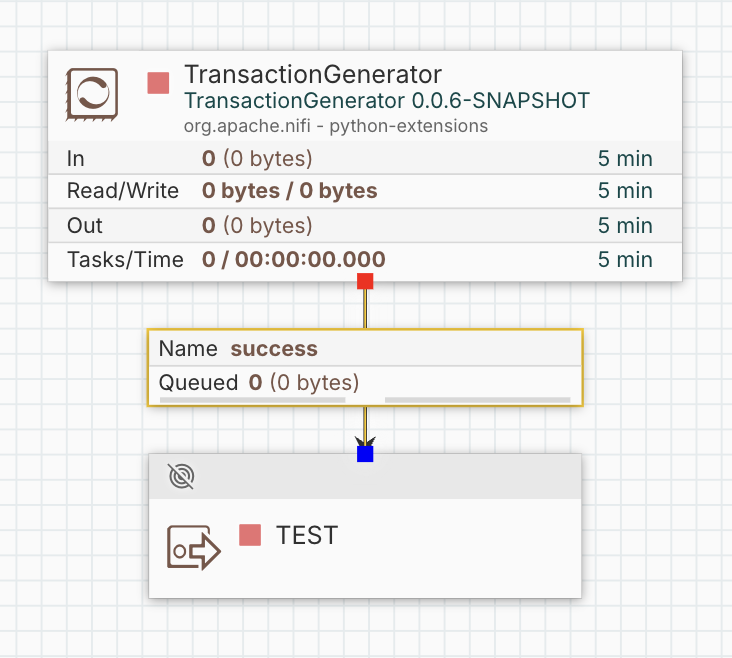
You can now repeat this process iterating your Version to ensure the python works as expected in NiFi.
 Pro Tip! Be patient after saving new changes to the filename. Refresh NiFi UI if needed and ensure you see your newest Version.
When you are done, lets clean up this nifi cluster:
kubectl delete -f nifi-cluster-30-nifi2x-python.yaml -n cfm-streaming
Step 2: Create a Custom Java / NAR Processor Example
We are now going to work on the Java / NAR example of a custom NiFi processor.
Run this Maven command (requires Java 21+ and Maven installed locally):
mvn archetype:generate \
  -DarchetypeGroupId=org.apache.nifi \
  -DarchetypeArtifactId=nifi-processor-bundle-archetype \
  -DarchetypeVersion=2.4.0 \
  -DnifiVersion=2.4.0 \
  -DgroupId=com.example \
  -DartifactId=my-custom-nifi-bundle \
  -Dversion=1.0.0-SNAPSHOT \
  -DartifactBaseName=mycustom \
  -DinteractiveMode=false
This generates a complete bundle project with:
- A sample processor (
MyProcessor.javainnifi-my-custom-nifi-bundle-processors/src/main/java/...) - The NAR packaging structure (ready for NiFi 2.4.0)
Navigate into the generated folder and build it:
cd my-custom-nifi-bundle
mvn clean install -Denforcer.skip=true
The NAR file will be at:
my-custom-nifi-bundle/nifi-mycustom-nar/target/nifi-mycustom-nar-1.0.0-SNAPSHOT.nar
Step 3: Set Up NFS NAR Provider Volume
Prerequisites
- Deploy the loader pod before your NiFi CR.
- Namespace is
cfm-streaming
Create a new file nar-loader.yaml:
apiVersion: v1
kind: PersistentVolumeClaim
metadata:
  name: custom-nars
  namespace: cfm-streaming
spec:
  storageClassName: "standard"
  accessModes:
    - ReadWriteOnce
  resources:
    requests:
      storage: 100Mi
---
apiVersion: v1
kind: Pod
metadata:
  name: nar-loader
  namespace: cfm-streaming
spec:
  containers:
  - name: ubuntu
    command:
    - /bin/bash
    image: ubuntu:latest
    stdin: true
    tty: true
    volumeMounts:
    - name: custom-nars-vol
      mountPath: /home/ubuntu/nars
  volumes:
    - name: custom-nars-vol
      persistentVolumeClaim:
        claimName: custom-nars
Apply it:
kubectl apply -f nar-loader.yaml
Wait for everything to be ready:
kubectl get pvc custom-nars -n cfm-streaming
kubectl get pod nar-loader -n cfm-streaming
Both should show Bound / Running.
Copy the NAR into the nar-loader:
kubectl cp my-custom-nifi-bundle/nifi-mycustom-nar/target/nifi-mycustom-nar-1.0.0-SNAPSHOT.nar nar-loader:/home/ubuntu/nars/ -n cfm-streaming
Verify the file is in the volume:
kubectl exec -it nar-loader -n cfm-streaming -- ls /home/ubuntu/nars/
Step 4: Create and Apply Your NiFi CR with NarProvider
Create nifi-cluster-30-nifi2x-nar.yaml as follows:
apiVersion: cfm.cloudera.com/v1alpha1
kind: Nifi
metadata:
  name: mynifi
  namespace: cfm-streaming
spec:
  replicas: 1
  nifiVersion: "2.6.0"
  image:
    repository: container.repository.cloudera.com/cloudera/cfm-nifi-k8s
    tag: 3.0.0-b126-nifi_2.6.0.4.3.4.0-234
    pullSecret: cloudera-creds
  tiniImage:
    repository: container.repository.cloudera.com/cloudera/cfm-tini
    tag: 3.0.0-b126
    pullSecret: cloudera-creds
  hostName: mynifi-web.mynifi.cfm-streaming.svc.cluster.local
  uiConnection:
    type: Ingress
    ingressConfig:
      hostname: ""
    annotations:
      nginx.ingress.kubernetes.io/affinity: cookie
      nginx.ingress.kubernetes.io/affinity-mode: persistent
      nginx.ingress.kubernetes.io/backend-protocol: HTTPS
      nginx.ingress.kubernetes.io/ssl-passthrough: "true"
      nginx.ingress.kubernetes.io/ssl-redirect: "true"
  security:
    initialAdminIdentity: "admin"
    nodeCertGen:
      issuerRef:
        name: cfm-operator-ca-issuer-signed
        kind: ClusterIssuer
    singleUserAuth:
      enabled: true
      credentialsSecretName: "nifi-admin-creds"
  configOverride:
    nifiProperties:
      upsert:
        nifi.cluster.leader.election.implementation: "KubernetesLeaderElectionManager"
  stateManagement:
    clusterProvider:
      id: kubernetes-provider
      class: org.apache.nifi.kubernetes.state.provider.KubernetesConfigMapStateProvider
  narProvider:
    volumes:
      - volumeClaimName: custom-nars
Apply the nar YAML:
kubectl apply -f nifi-cluster-30-nifi2x-nar.yaml -n cfm-streaming
The CFM Operator will reconcile, mount the volume into all NiFi pods, and load the custom NAR.
Step 5: Verify the Custom Processor Is Loaded
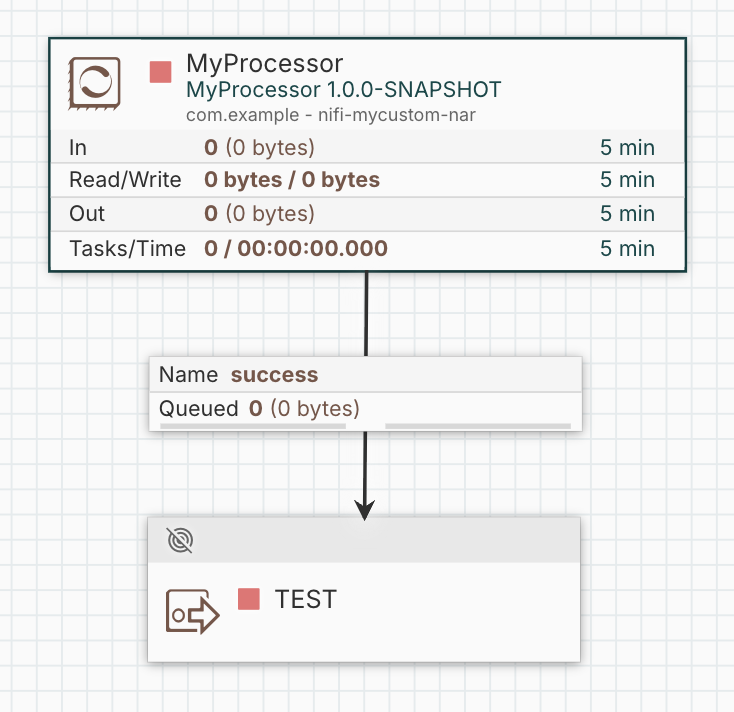
Open the NiFi UI. In the processor palette, search for MyProcessor — it should appear.
Step 6: Troubleshooting
- Check NiFi app log:
kubectl logs mynifi-0 -c app-log -n cfm-streaming
- Confirm the volume is mounted and the files are present:
kubectl exec -n cfm-streaming mynifi-0 -- ls -la /opt/nifi/nifi-current/python/extensions
kubectl exec -it mynifi-0 -n cfm-streaming -- ls /opt/nifi/nifi-current/extensions/custom-nars/
- If the processor does not appear:
- Verify the NAR file is inside the PVC (
kubectl execintonar-loader). - Check that the PVC is Bound and the pod is Running.
- Make sure the NAR structure inside the file is correct
- Verify the NAR file is inside the PVC (
- You can delete/recreate the
nar-loaderpod anytime if you need to add more NARs later.
The Verdict: Custom Processors Working in Kubernetes
And there you have it—a peek under the hood of how we bridge the gap between “I have a cool idea for a processor” and “it’s actually running in my development environment”. Whether you’re a fan of the rapid-fire Python iteration cycles using local minikube mount points or you prefer the structured, battle-tested robustness of Java NARs deployed via a dedicated NarProvider, Cloudera Streaming Operators gives you the plumbing to make it happen in your kubernetes cluster.
By mastering the art of the NiFi Custom Resource (CR) and volume orchestration, you’re no longer limited to what’s “in the box”. You’ve now got the blueprint to inject custom synthetic data, complex business logic, or niche integrations directly into your data pipelines. Now go forth, build that custom logic, and let your Kubernetes pods do the heavy lifting!
Terminal Commands
kubectl describe pod mynifi-0 -n cfm-streaming
kubectl logs mynifi-0 -n cfm-streaming -c nifi --previous
kubectl get pvc custom-nars -n cfm-streaming -o yaml
kubectl describe pvc custom-nars -n cfm-streaming
kubectl get sc standard -o yaml

kubectl logs mynifi-0 -c app-log -n cfm-streaming
kubectl exec mynifi-0 -c nifi -n cfm-streaming -- grep "nifi.python" /opt/nifi/nifi-current/conf/nifi.properties
kubectl exec -it mynifi-0 -c nifi -n cfm-streaming -- find /opt/nifi/nifi-current/work -name "TransactionGenerator.py"

kubectl exec -n cfm-streaming mynifi-0 -- ls -la /opt/nifi/nifi-current/python/extensions

minikube mount /nifi-custom-processors:/extensions --uid 10001 --gid 10001

kubectl apply -f nifi-combined.yaml -n cfm-streaming
kubectl delete -f nifi-combined.yaml -n cfm-streaming

kubectl delete -f nifi-cluster-30-nifi2x-python.yaml -n cfm-streaming
kubectl apply -f nifi-cluster-30-nifi2x-python.yaml -n cfm-streaming

kubectl delete -f nifi-cluster-30-nifi2x-nar.yaml -n cfm-streaming
kubectl apply -f nifi-cluster-30-nifi2x-nar.yaml -n cfm-streaming
Resources
- Apache NiFi Python Developer Guide
- Cloudera Streaming Operators
- NiFi 2.0 Processor Playground
- NiFi Templates Repo
Custom NiFi Processors with Cloudera Streaming Operators
Please reach out to schedule a discussion if you would like a deeper dive, hands on experience, or demos of the integration between these components.