 Cloudera
How to AI with MiNiFi
Updated:
The companion post to this one, “How to AI with NiFi and Python,” runs Python inference inside NiFi on a Kubernetes cluster with room to spare. This post is the opposite end of the wire. A MiNiFi agent on a small edge box, say a Beelink mini PC or a Windows desktop or a Jetson or a bare Kubernetes pod, has no business hosting a model but still needs to do AI work. The agent almost never runs the model itself. It routes, it transforms, it enrolls, and it ships results back over Kafka. Everything below is the using side of Edge Flow Manager, how you drive AI flows onto agents you have already stood up. Every flow, port, and processor name here comes from running these agents in the field.
 This is the “using” post, not the “installing” post. Staging agent binaries, the five-leaf EFM directory layout, the Windows MSI Python black hole, the missing Java NARs, all of that lives in the companion post, “Working with EFM Binaries.” Read that one first if your
 Deploy Agent button is still handing you a 400. This post assumes you have agents online and asks the next question. What do you make them do?
The edge agent doesn’t run the model, it routes to one
The single most useful shape at the edge is a MiNiFi agent that fronts a nearby inference server. The agent is tiny. The GPU box next to it holds the model. My working example is the StarlinkAI router, a MiNiFi Java agent on a Beelink SER9 that takes HTTP requests and forwards them to a local Lemonade Server (AMD’s OpenAI-compatible inference server, llamacpp:vulkan backend on a Radeon 780M iGPU). The whole flow is three stock processors, one port, and no Kafka:
HandleHttpRequest (:8090, any path)
  → InvokeHTTP        (POST http://localhost:13305${http.request.uri})
  → HandleHttpResponse (returns Lemonade's real answer synchronously)
No custom code, no per-endpoint branching. The InvokeHTTP URL is a pure pass-through. Whatever path the client hits is the path forwarded to Lemonade, so one flow fronts all five Lemonade services (chat, embeddings, reranking, TTS, transcription) from a single ListenHTTP/InvokeHTTP pair, not one pair per service. The agent doesn’t know what a model is. It accepts a POST, forwards it, and hands the response straight back. The value is the flow, the enrollment, and the transport, not the inference.
This replaces an earlier MiNiFi C++ design. MiNiFi C++’s ListenHTTP has no synchronous request/response pair. The caller always got an empty 200 ack, with the answer shipped out-of-band over Kafka keyed on a client-supplied request_id. ListenHTTP also silently dropped multipart POSTs (transcription) at its buffer-full check, a MINIFICPP-2243-shaped bug I never fully root-caused on the C++ side. MiNiFi Java ships HandleHttpRequest/HandleHttpResponse, a synchronous response with no Kafka detour, and the multipart drop doesn’t reproduce.
All five endpoints run end-to-end. Chat returns a synchronous completion, embeddings a vector, reranking relevance scores, speech a Kokoro MP3, and transcription a Whisper transcript. Four of them are pure pass-through, the same three processors on the same code path, with only the URL differing. Transcription needs one extra step. HandleHttpRequest splits a multipart POST into one FlowFile per form field, so a small reassembly branch (RouteOnAttribute → ReplaceText × 2 → MergeContent Defragment) recombines the fragments into valid multipart before InvokeHTTP. It forks in behind a RouteOnAttribute-HasFragments gate so nothing else is touched. That leg runs on the production port with no regression to the other four.
One gotcha this design introduced. InvokeHTTP’s Socket Read Timeout defaults to 15 secs, and LLM inference routinely takes 10-25s and up. Every request failed silently on that default. A SocketTimeoutException auto-terminated on Failure with nothing routed back, so the caller sat until the HTTP context map’s own 60s expiration gave up with a generic 503. Set it to match your slowest endpoint (10 mins here), not the framework default.
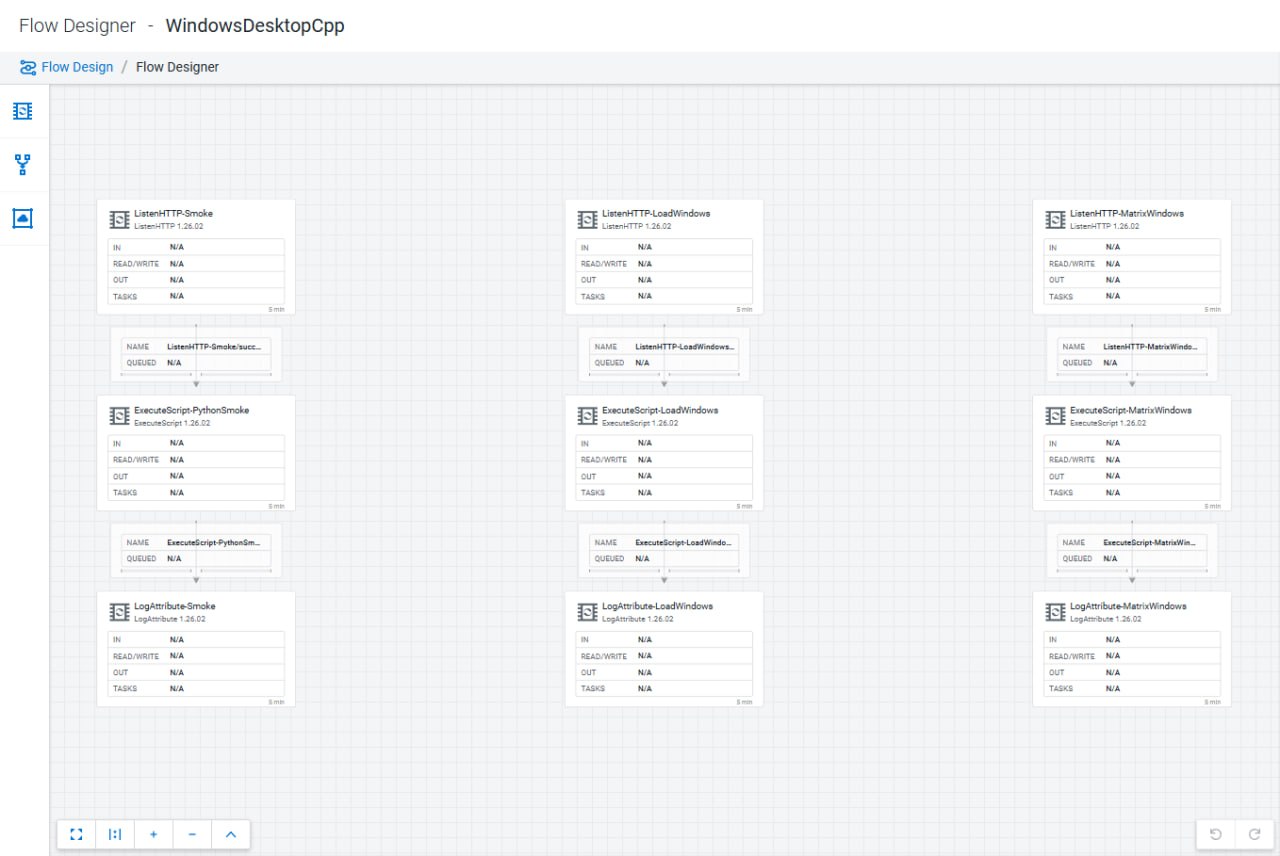
ListenHTTP vs HandleHttpRequest/HandleHttpResponse, the fork that shapes every edge AI flow
The single design decision that decides what an edge AI flow can do is which HTTP entry processor it uses, because the two families answer the caller completely differently.
ListenHTTP, the only HTTP-ingest processor MiNiFi C++ ships, is fire-and-forget. It accepts a POST and immediately returns an empty 200 ack. It has no way to send a computed body back on the same connection. If the caller wants the model’s answer, that answer has to arrive out-of-band. The classic shape is ListenHTTP → … → PublishKafka, with the client polling a Kafka topic keyed on a request_id it supplied in the request. Two extra moving parts, a broker and a correlation key, exist purely because the front door can’t talk back. ListenHTTP also carries the 5/5 batch/buffer trap and, on some C++ builds, a residual 1/1 multipart drop (MINIFICPP-2243).
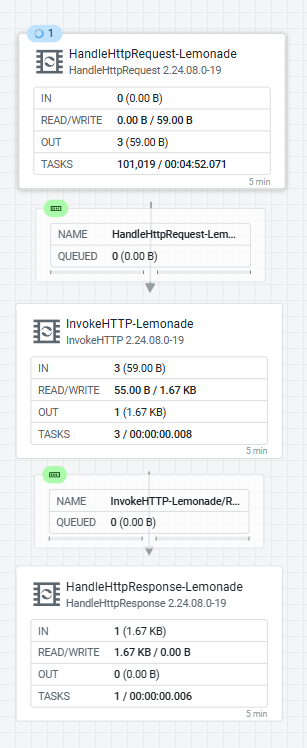
HandleHttpRequest plus HandleHttpResponse, MiNiFi Java with the StandardHttpContextMap controller service, are a synchronous pair. HandleHttpRequest parks the caller’s connection in the context map keyed by http.context.identifier, the flow does its work, and HandleHttpResponse writes the body and status back on that same parked connection. No broker, no polling, no request_id. The caller gets the model’s answer as the HTTP response to its own request. That is the decisive capability for an HTTP-fronted inference proxy, and it is Java-only.
StarlinkAI, before and after
Before (C++ ListenHTTP, fire-and-forget over Kafka):
client → ListenHTTP(:PORT, request_id) → InvokeHTTP(Lemonade) → PublishKafka(results)
client ← (empty 200 ack)
client ⟳ polls a Kafka topic for its request_id … eventually reads the answer
Every service needed its own ListenHTTP/InvokeHTTP pair, a Kafka round trip, and client-side correlation, and multipart transcription POSTs were silently dropped at the buffer check.
After (Java HandleHttpRequest/HandleHttpResponse, synchronous):
client → HandleHttpRequest(:8090, any path)
       → InvokeHTTP(POST http://localhost:13305${http.request.uri})
       → HandleHttpResponse(200) → client   (Lemonade's real answer, inline)
One flow, one port, no Kafka, no request_id. All five Lemonade endpoints ride the same three processors, distinguished only by the forwarded path.
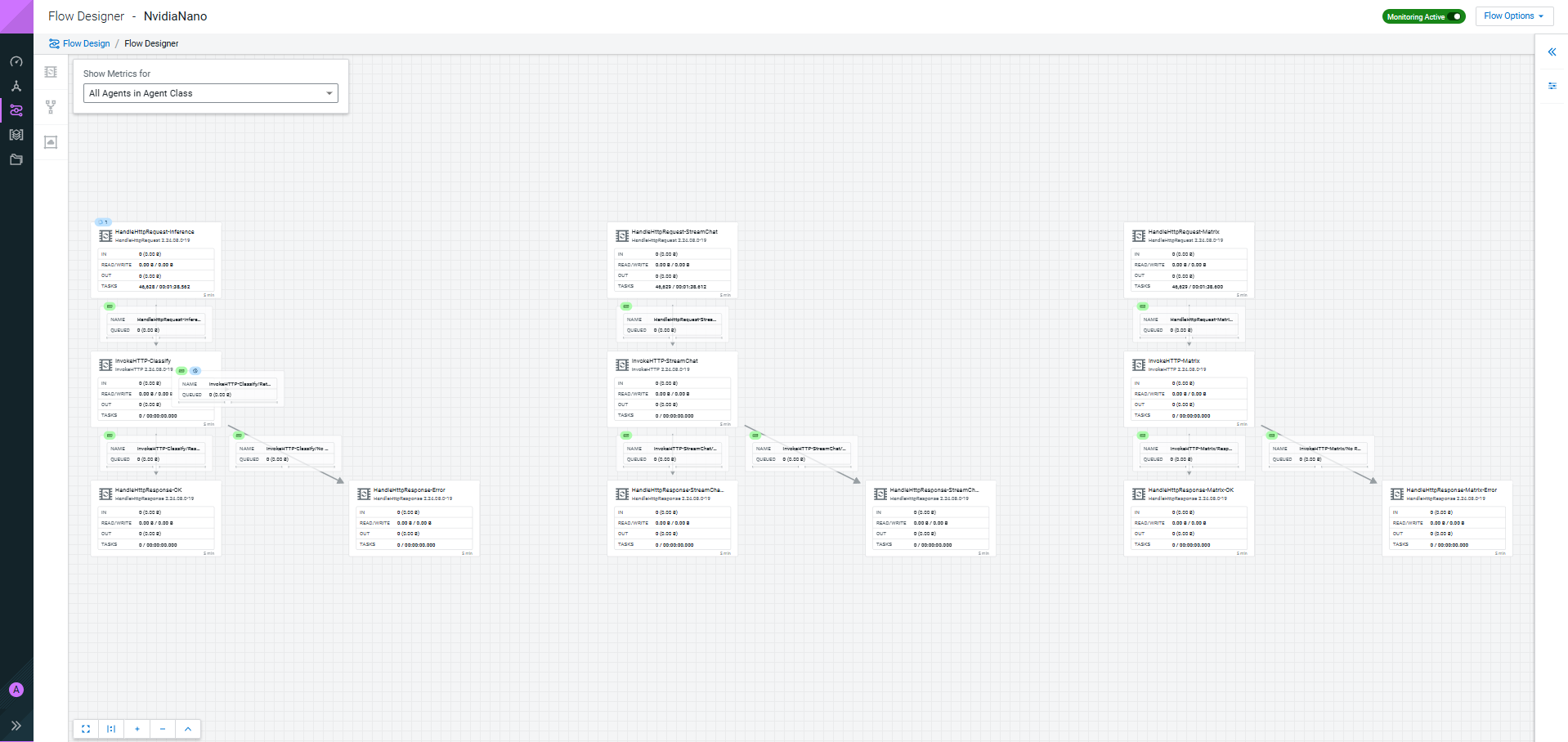
NvidiaNano, before and after
The Jetson is the same fork seen from the inference side.
Before. The production ingest listeners (/streamChatListener, /matrixListener, /contentListener) were C++ ListenHTTP → PublishKafka, fire-and-forget, and prone to silently dropping POSTs at the buffer-full check (a MINIFICPP-2243-shaped bug). The “AI” processor was worse than fire-and-forget. It was an ExecuteScript that re-read its script and re-deserialized the TensorRT engine on every trigger, a per-request model load costing far more than the inference it was there to run.
After. One resident TensorRT daemon (127.0.0.1:5910, MobileNetV2 FP16, ~4 ms) fronted by a Java MiNiFi agent running three HandleHttpRequest → InvokeHTTP → HandleHttpResponse legs for /classify, /streamChatListener, and /matrixListener. It is the StarlinkAI shape again, each leg returning a response inline, not an ack-and-hope. systemctl --user restart trt-infer swaps the model without touching MiNiFi.
The takeaway. If the caller needs the model’s answer back, that is a HandleHttpRequest/HandleHttpResponse flow on a Java agent. If the traffic is fire-and-forget telemetry, ListenHTTP → PublishKafka on C++ is fine, as long as you set batch/buffer to 1/1 and know the multipart caveat.
When the agent does need to compute, two Python paths that are not the same
Sometimes routing isn’t enough and you want logic to run on the agent itself, to enrich a FlowFile, call a library, or reshape a payload before it leaves the edge. MiNiFi C++ gives you two ways to run Python, and conflating them is the most common mistake I see (I made it myself in an earlier draft). They are different processors with different reload behavior.
ExecuteScript (Python engine) |
Custom Python processor | |
|---|---|---|
| What it is | One generic processor you paste a script body into | A new processor type you author in Python |
| Identity in the flow | Always shows as ExecuteScript
|
Shows under its own name, with its own properties/relationships |
| Reload | Re-reads the script every trigger, hot-edit, no restart | Not a hot patch, agent restart to pick up changes |
Pick ExecuteScript when you want to iterate on a snippet fast. Pick a custom processor when the logic deserves to be a first-class, reusable thing in the palette. The next two sections take each in turn.
ExecuteScript, paste Python into one processor
ExecuteScript is the fastest way to run arbitrary Python on the edge. Wire it inline, set Script Engine: python, and paste a body that implements onTrigger:
ListenHTTP :18080 /contentListener
  → ExecuteScript (Script Engine: python)
  → LogAttribute (Log Payload = true)
def onTrigger(context, session):
    flow_file = session.get()
    if flow_file:
        session.putAttribute(flow_file, "python.smoke", "edge-executescript-ok")
        session.transfer(flow_file, REL_SUCCESS)
POST a payload and the attribute lands on LogAttribute, which shows the extension didn’t only load, it executed. The property that makes ExecuteScript pleasant to work with is simple. A running C++ agent re-reads its Script File from disk on every trigger. Edit the script, POST again, and the new logic runs with no restart and no republish. In EFM Designer flows the C++ FQCN is org.apache.nifi.minifi.processors.ExecuteScript (note the minifi in the path, it is not the Java NiFi org.apache.nifi.processors.standard.ExecuteScript).
Two things bite here, both covered in depth in the companion posts:
-
ExecuteScriptis not in any stock Cloudera binary. Not the C++ image, not the CEM Java tarball, not the default Windows MSI feature set. The tell isCould not instantiate: PythonScriptExecutorrepeating every 30s inminifi-app.log, or an EFM designer “not a valid Processor type” rejection. Getting the engine onto the agent is an install problem, and the four paths (C++ extra-extensions injection, source build, Java NAR drop-in, WindowsADDLOCAL=ALL) are in “Working with EFM Binaries.” One caveat matters for this post. Only three of those four give you the Python engine. The Java NAR drop-in gets youExecuteScriptwith Groovy/Clojure only, no Python, in the Java NAR build. PythonExecuteScriptat the edge means a C++ agent (or the Windows C++ MSI), not the Java agent. The engine is settled on the C++ K8s pods and on the Jetson through extra-extensions injection. -
A Windows-service agent can’t drive a visible GUI. An
ExecuteScriptthat shells out to launch a window runs green, with a200, attributes set, and the target process even spawning, but the window never appears, because a defaultLocalSystemservice lives in Session 0 with no interactive desktop. Run the agent in process-mode (Session 1) for anything that has to show up on screen.
Getting the script onto the agent is its own step, independent of the engine. Two mechanisms:
-
EFM Resource Manager API.
POST /efm/api/resource-manager/resources/file, thenPUT /efm/api/agent-class-resource-manager/{agentClass}/savewith exactly{"resourceIdsToBeAssigned":[...],"resourceIdsToBeUnassigned":[...]}(a bare array is silently swallowed). This is the tracked, restart-durable path, and it needs theefm-resourcesPVC, or the uploaded bytes die with the pod while the DB row survives pointing at nothing. -
Raw
kubectl cponto the agent’s script path. Takes effect on the next trigger, great for fast iteration, but bypasses EFM tracking and does not survive a pod restart.
Custom Python processors, author your own edge processor type
When the logic is worth keeping, write it as a processor of its own. A custom Python processor is a new type. It appears in the agent’s manifest under its own name, with its own properties and relationships, and wires into a flow like any stock processor. On the C++ agent you subclass the pre-shipped nifiapi framework:
from nifiapi.flowfiletransform import FlowFileTransform, FlowFileTransformResult

class EdgeTagger(FlowFileTransform):
    class ProcessorDetails:
        version = "0.0.1"
        description = "Tags a FlowFile with an edge attribute and passes it through."

    def transform(self, context, flowfile):
        return FlowFileTransformResult(
            relationship="success",
            attributes={"edge.tag": "field-test"},
        )
Drop that .py into the agent’s configured processor directory (nifi.python.processor.dir, which ships pointing at ${MINIFI_HOME}/minifi-python/, with authored processors going in the sibling nifi_python_processors/ package) and restart. The agent’s PythonCreator scans the directory once at boot and registers the type under its own FQCN. EdgeChromeLoader comes up as org.apache.nifi.minifi.processors.nifi_python_processors.EdgeChromeLoader in GET /efm/api/agent-manifests/{id}, with the typeDescription field carrying the exact text from my class’s ProcessorDetails.description. The authored describe() ran, not a placeholder. From there it wires into an EFM Designer flow (ListenHTTP → EdgeTagger → LogAttribute) like any stock processor, with no special-casing to reference a custom type, and publishes with no validation errors.
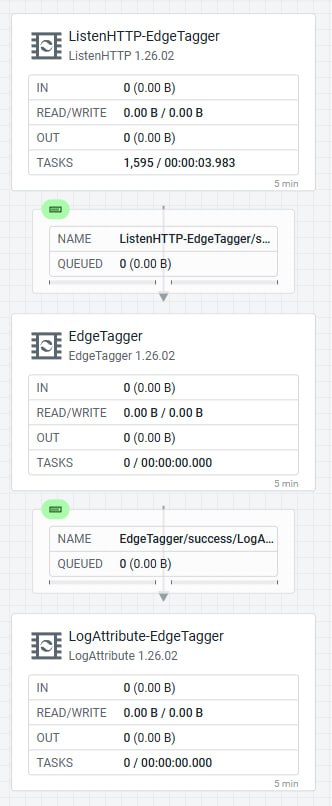
 A custom processor is not a hot patch. Because
 PythonCreator scans at boot, a .py dropped in (or edited) after the agent is up is not picked up until the agent restarts. This is the sharp difference from ExecuteScript, which re-reads every trigger. If your iteration loop is “tweak and re-POST,” use ExecuteScript. If you are shipping a stable capability, author a processor and accept the restart.
Delivery scales the same two ways as scripts. Bake it into the image or drop it in by hand for a fixed agent, or push it as an EFM Resource into the agent’s asset directory over the C2 asset-sync command for the managed path, with no image rebuild and no manual copy. The managed asset-directory delivery runs on the arm64 K8s C++ leg (EdgeTagger delivered as a resource, synced in ~5s, .state digest matched, registered as a first-class type, flow green with no drops). The C++ Java-agent path ships a parallel py4j-based framework (python/api/nifiapi/, python/framework/) that is structurally present but not yet exercised end-to-end, wired but not yet run.


Driving it all from EFM, the Designer write contract
Everything above is published to agents through EFM, and the EFM Flow Designer API has one contract that will waste your afternoon if you assume the obvious. There is no whole-flow PUT. PUT /efm/api/designer/flows/{flowId} returns 405 Request method 'PUT' is not supported. You build a flow one component at a time:
# create one processor — the server assigns the real identifier; your client UUID is ignored
POST /efm/api/designer/flows/{flowId}/process-groups/{pgId}/processors
# wire one connection
POST /efm/api/designer/flows/{flowId}/connections
# validate the whole in-progress flow before going live
GET  /efm/api/designer/flows/{flowId}/validate
# publish to the agent class
POST /efm/api/designer/flows/{flowId}/publish
Two gotchas that GET .../validate catches before publish. New processors don’t get their autoTerminatedRelationships set for you (an EvaluateJsonPath needs failure and unmatched terminated explicitly, or publish 409s). EFM’s Designer also has no disabled or inert state, so a single invalid or orphaned processor anywhere on the canvas blocks /publish. Building the StarlinkAI router this way, publishing the flow returned {"dirty":false,"localChanges":false} and HTTP 200, and the agent bound all five ports on its next heartbeat.
The other EFM rule that catches people is the mapping. The Designer validates against the agent class to manifest mapping, not against whatever agent is online. Put a Java agent on a class whose flow was authored for C++ and the Designer rejects the processors, because the FQCNs differ (org.apache.nifi.minifi.processors.ListenHTTP vs the Java equivalent). When you add NARs or extensions to a running agent, its new processors stay invisible to the Designer until you re-point the class mapping to the agent’s new agentManifestId. I keep mixed runtimes as parallel classes, WindowsDesktopCpp separate from the Java WindowsDesktop and KubernetesPodJava separate from the C++ KubernetesPod, so a Java agent never lands on a C++ canvas.
Let the AI drive EFM, the MCP servers
Since this post was first written, the fleet gained an MCP front door. My Edge Flow Manager MCP Server (cldr-steven-matison/edge-flow-manager-mcp-server) is read-only, 12 tools over EFM’s REST API covering agent classes, agents, manifests, designer flows, and resources, reaching EFM on port 10090. MiNiFi has no REST API of its own, so an MCP server that sits over EFM is in effect an MCP server over the whole MiNiFi fleet. Point an assistant at it and it can read the class, the manifest, and the published flow the same way the sections above read them by hand.
On the NiFi side, Cloudera’s NiFi MCP Server (cloudera/NiFi-MCP-Server) exposes 66 tools, 24 read-only ones on by default and 42 write tools gated behind NIFI_READONLY=false. The write tools hit the same sensitive-property trap as the raw API, where a read returns a masked value and writing it back destroys the credential, so leave NIFI_READONLY=true unless you need the write path.
The nifi-and-ai skill, the playbook these flows come from
Everything above is codified in a Claude skill, nifi-and-ai (skill), that rides along in the repo. It’s the distilled version of every bug in this post, and for MiNiFi specifically it earns its keep in a few concrete places:
-
Flow dev. The synchronous-router shape, the
ListenHTTP5/5trap, theRetry-isn’t-Failuredrop, and theInvokeHTTP-defaults-to-GETand 15s-timeout footguns are each a rule, not a rediscovery. Build a new edge flow and the skill already knows the shape and where it silently breaks. -
API work. The EFM Flow Designer contract (no whole-flow
PUT, build component-by-component,GET …/validatebefore/publish), the Resource Manager upload body that gets silently swallowed if it is a bare array, and the “dump the runningflow.jsonbefore you edit” rule all sit in the skill’s reference files. -
Knowing what is in the build. Which processors a given agent has is not a given. C++ and Java ship different manifests,
ExecuteScript’s Python engine is absent from every stock binary, and the Designer validates against the agent-class to manifest mapping and not the running agent. The skill names these so you check the manifest before assuming a processor exists. -
Layout. A
references/layout.mdwith the EFM row and column pitch constants, written because two fresh builds landed cramped at the tighter NiFi pitch before the numbers were pinned. -
Testing. Send a payload through the pipeline, dump the running flow, and read
minifi-app.logfor the attributes it set. Never edit from a remembered description. The transcription fix above was root-caused by diffing the log against a multipart probe.
A human injection on that fourth bullet. It deserves more than the one line the summary gave it.
**layout** is the item an AI reliably buries. I asked for it explicitly and it still came back as a footnote wedged between API work and testing. To an AI a flow is a graph and the coordinates are noise. The data moves the same whether the boxes are aligned or stacked on top of each other. You're the one who opens that canvas when a flow is silently dropping data, tracing a single connection through a tangle of overlapping processors to find which `InvokeHTTP` of the four is the one timing out. Readable layout is the difference between reading a flow and excavating it. The unspoken assumption under the covers is that a *properly* built NiFi or MiNiFi flow in production would never need a human's eyes on it :eyes: Why bother making it legible? Something always breaks, and the first thing someone else might do is look at your flow. Spend the two minutes on the pitch and the alignment; the future-you is the one who benefits.
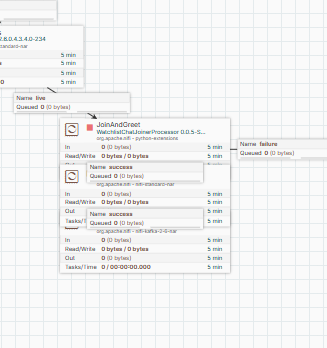
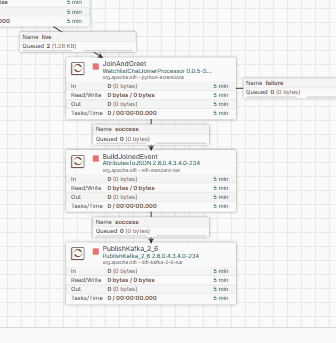
EFM-directed vs direct-on-agent
There are two ways to change what an agent does, and they are not interchangeable:
- EFM-directed. Author the flow in the EFM Flow Designer and publish it to the agent class over C2, and the agent picks it up on its next heartbeat. This is the tracked, durable, fleet-wide path. The flow is versioned in EFM, survives agent restarts, and applies to every agent in the class. It is also the only path with a write contract to respect (component-by-component, validate, publish) and a class-to-manifest gate that rejects a C++ flow published onto a Java class.
-
Direct-on-agent. Touch the box itself.
kubectl cpa script onto the agent’s script path, drop a.pyinto the processor directory, or editconfig.yml. Immediate and ideal for iteration, but it bypasses EFM entirely, so nothing is tracked and a pod restart or C2 reconcile can wipe it. Worse, EFM owns some agent properties. A hand-edit to aminifi.propertieskey EFM manages gets regenerated (often empty) on the next boot, and some properties are denylisted from C2 push altogether.
 The rule of thumb. Iterate direct-on-agent, ship EFM-directed. Prototype a script with
 kubectl cp because it hot-reloads. Once it is stable, deliver it as a tracked EFM Resource so it survives a restart.
A few more concepts that kept surfacing
Beyond the flow mechanics, the high-level ideas that cost time until they were named:
- An agent class is not one machine. A class is a manifest plus a published flow, and any number of agents can join it. Publish once and every agent in the class converges. Mixed runtimes (C++ vs Java) must be parallel classes or the FQCNs collide.
-
The running flow is the only truth. The canvas drifts from your notes faster than you would think, so dump
GET /efm/api/designer/flows/{id}or the agent’sconfig.ymlbefore editing, every time. -
Persistence has layers. The flow (EFM/C2), the scripts and assets (Resource Manager, needs the
efm-resourcesPVC or the bytes die with the pod), and the agent’s own state are three different stores with three different lifetimes. “It’s saved” means naming which store. - EFM holds write authority over agent properties. This is why direct file edits revert, and why a metrics endpoint you can’t open through config might still be reachable another way, for example by relaying over Site-to-Site to a NiFi that already has the API open, not by opening one on a headless agent.
-
Manifest staleness bites silently. Change a processor’s properties without changing its name and the Designer can serve a cached manifest. The new field won’t appear until the class is re-pointed at the agent’s new
agentManifestId.
The lessons that save you a debugging session
These are the ones I’ve paid for more than once, the distilled version of my NiFi/MiNiFi playbook, the traps that make a flow silently drop data without erroring:
-
ListenHTTPBatch Size/Buffer Sizedefault to5/5. A single request never fills the buffer and is dropped withbuffer is NOT full 1/5. Set both to1(MINIFICPP-2243 off-by-one). This is the first thing to check when a flow “does nothing.” -
InvokeHTTP’sHTTP Methodsilently staysGET. Even when you meantPOST. Every Lemonade call was a bodyless GET until I set it explicitly. -
A broker hands the client the address to reconnect on, and it has to be one the client can reach. This bit me on Kafka but it is a general edge lesson. The first connection succeeds, then the broker advertises the endpoint clients should use for ongoing traffic. If that advertised address is an internal cluster hostname or a raw pod IP, an agent outside the cluster can’t route to it and the connection silently stalls. From outside, point clients at an externally reachable endpoint (a NodePort, a LoadBalancer, or an ingress) and make the broker advertise that address, not its in-cluster service name. The rule generalizes past Kafka. Any service that redirects a client to a second address has to advertise one that is reachable from the network the client is on.
-
Retryis notFailure. Auto-terminatingInvokeHTTP’sRetryrelationship silently drops every transient 5xx/429. Self-loopRetrywith a boundedFlowFile Expirationand routeFailureto a log processor. -
The running flow is truth. Before editing a running agent’s flow, pull what is there (
GET /efm/api/designer/flows/{id}, or dump the agent’sconfig.yml). Don’t edit from a remembered description. The running canvas has drifted from your notes more often than not. -
Never GET-then-PUT a processor that has sensitive properties. EFM/NiFi returns
********for a sensitive value on read. PUT it back and you write that literal over the credential. Bind secrets to a Parameter Context, or use a narrow-scope endpoint. (The router’s processors have none, which is why the three full-entity PUTs to fix relationships were safe.)
What NOT to do
-
Don’t wait on the
ListenHTTPresponse for your model output. MiNiFi C++ is fire-and-forget. The answer comes back on Kafka keyed byrequest_id, not in the HTTP reply. -
Don’t conflate
ExecuteScriptwith a custom Python processor. One hot-reloads every trigger. The other needs a restart. Reach for the wrong one and your iteration loop fights you. -
Don’t expect
ExecuteScriptto exist in a stock agent. It’s a build-time or feature-time capability. See “Working with EFM Binaries” to get the engine on the agent first. -
Don’t drive a GUI from a
LocalSystemservice agent. Session 0 has no interactive desktop. The process spawns but no window ever appears. Use process-mode. -
Don’t
PUTa whole flow to the Designer. There’s no whole-flow PUT (405). Build it component by component andGET .../validatebefore/publish. - Don’t publish onto a class whose manifest doesn’t match the agent’s runtime. The Designer validates against the class-to-manifest mapping. A C++ flow on a Java-mapped class (or vice versa) gets rejected FQCNs and phantom processors.
-
Don’t leave
ListenHTTPat5/5orInvokeHTTPatGET. The two defaults that drop or neuter more edge flows than anything else. -
Don’t point MCP Inspector
@0.14.0at a v1 EFM MCP server and trust an empty Tools pane. The version mismatch renders no tools even when the server is healthy. Pin a compatible Inspector version.
How to AI with MiNiFi
If you would like a deeper dive, hands on experience, demos, or are interested in speaking with me further about How to AI with MiNiFi please reach out to schedule a discussion.