 Cloudera
How To: Local NiFi Development and Cloudera DataFlow Deployment
Updated:
Cloudera DataFlow does not expose the NiFi REST API. You cannot build a flow there from a script, and you cannot build one there with the AI. Every DataFlow build happens by hand in Flow Designer. So I build somewhere I can drive the API, on a NiFi I run myself in the same NiFi 2.x family as DataFlow, prove the flow end to end, export it, and carry it over. The only things that change on the other side are the Parameter Context and where the JDBC drivers come from. This post is that whole loop, with one flow as the example: vehicle events read from a warehouse, enriched, and written to HBase through Phoenix for fast point reads by VIN.
The Flow
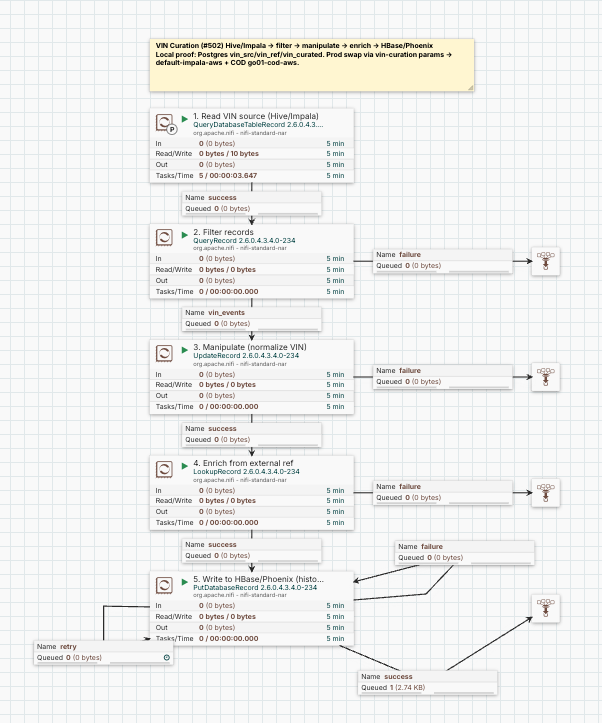
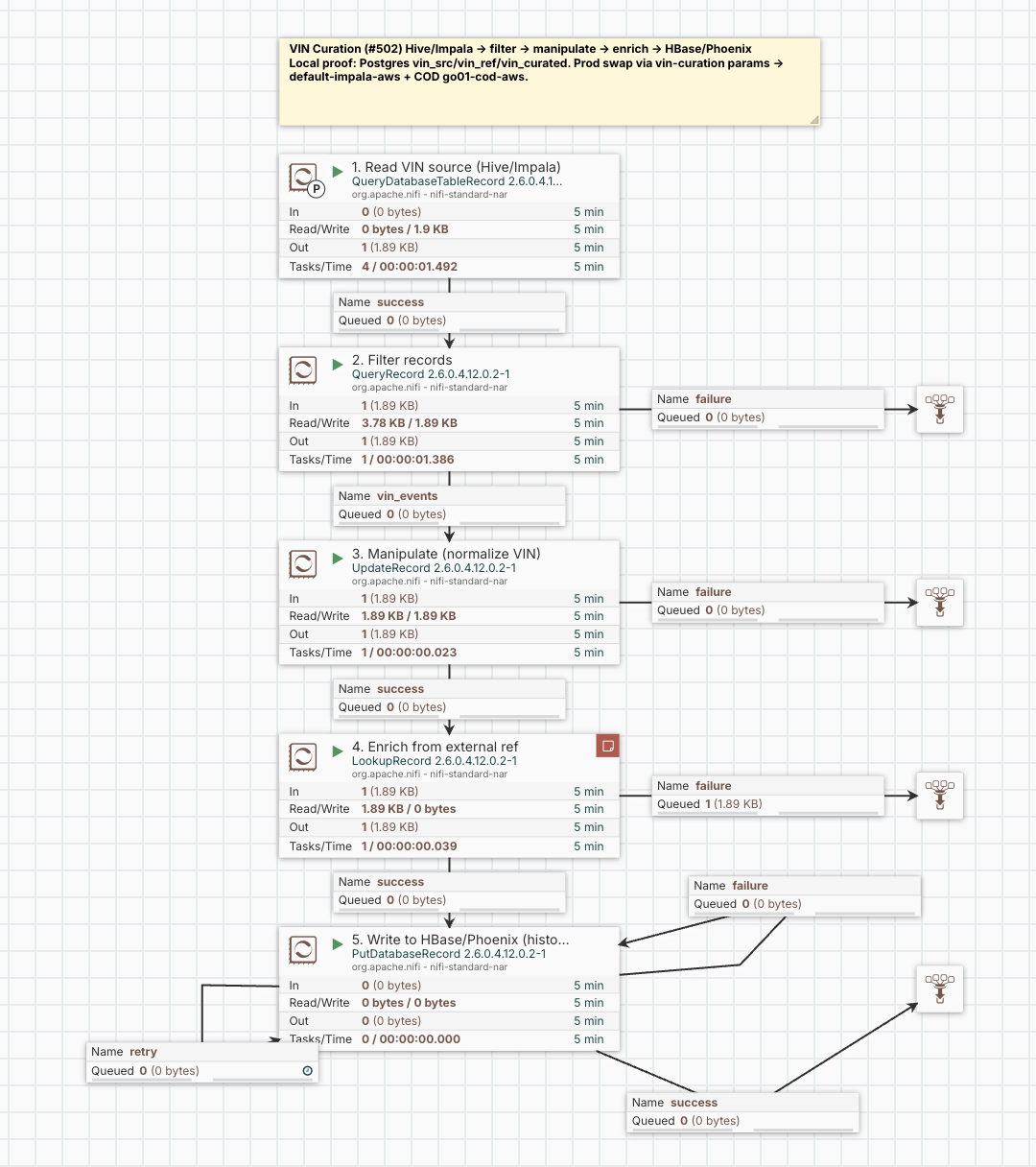
The customer wants VIN-curated rows in HBase so a lookup by VIN is a single point read, with the history of each VIN preserved. Five stages, all stock NiFi 2.x record processors:
QueryDatabaseTableRecord   read vehicle events (incremental on event_id)
  -> QueryRecord           SELECT * FROM FLOWFILE WHERE vin IS NOT NULL
  -> UpdateRecord          /vin = ${field.value:toUpper()}
  -> LookupRecord          enrich from a reference table (make, model, year, region, market)
  -> PutDatabaseRecord     UPSERT into Phoenix VIN.VIN_CURATED, lands in HBase
There is no PutPhoenix or PutHBase to drag onto the canvas. NiFi 2.x dropped the native HBase, Hive, and Phoenix bundles, which is exactly why the write looks unsupported. It is not. Phoenix is a JDBC SQL layer over HBase, so writing a Phoenix table is writing HBase, and the stock PutDatabaseRecord over a Phoenix JDBC connection pool does it.
Build It Where You Have the API
I build on CFM-operator NiFi 2.6.0 running on a minikube cluster. That version is the same NiFi 2.x family as DataFlow, so a flow definition exported here imports into Flow Designer without a version fight. It is also API-drivable, which means I build the flow component by component over REST instead of clicking, and I keep the whole build in a script.
NiFi binds to its pod DNS name, not loopback, so a Mac-side port-forward gets refused. I reach the API from a small helper pod inside the cluster, authenticated with the operator’s mTLS user cert:
# napi.sh — curl the NiFi REST API from the in-cluster helper pod
NS=cfm-streaming
POD=nifi-api
BASE=https://mynifi-web.cfm-streaming.svc.cluster.local:8443/nifi-api
CERT="--cert /certs/tls.crt --key /certs/tls.key -sk"

kubectl exec "$POD" -n "$NS" -- sh -c "curl $CERT -X GET '$BASE/flow/process-groups/root'"
For the UI I want the same hostname the cert is issued for, so the browser has to send that name as SNI while resolving it to the tunnel. A dedicated Chrome does both:
# open-nifi-mac.sh — requires: sudo minikube tunnel -p iceberg-lab
HOST="mynifi-web.cfm-streaming.svc.cluster.local"
open -na "Google Chrome" --args \
  --user-data-dir="$HOME/.chrome-nifi-mac" \
  --host-resolver-rules="MAP $HOST 127.0.0.1" \
  --ignore-certificate-errors --test-type \
  "https://$HOST/nifi/"
The .local name would otherwise go to mDNS and never read /etc/hosts. --host-resolver-rules maps the exact name to 127.0.0.1 inside Chrome, so the request rides the tunnel while the real name still travels as SNI and Host, the cert validates, and the ingress routes it.
Every stage builds from the nifi-and-ai skill over that API: component by component, never a whole-flow PUT, and never a GET-then-PUT of a processor that holds a secret, because the GET hands you ******** and the PUT writes that back over the credential. Secrets live only in the Parameter Context. The source and write connection pools stay disabled in the committed flow until I type the CDP workload password into the UI, so no credential is ever in the file.
Writing to Phoenix: Schema, Not Database, and Time as BIGINT
Two settings make the Phoenix write land on Cloudera Operational Database. Both come from the fact that COD publishes the Phoenix Query Server over Knox, so the pool uses the Phoenix thin client:
jdbc:phoenix:thin:url=https://cod--xxxx-gateway.<env>.cloudera.site/cod--xxxx/cdp-proxy-api/avatica/;serialization=PROTOBUF;authentication=BASIC
Driver class org.apache.phoenix.queryserver.client.Driver; the workload user and password pass as the avatica_user and avatica_password connection properties, not inline in the URL.
First, write by schema, not database. COD maps the Phoenix schema to an HBase namespace, so in PutDatabaseRecord I set Schema Name = VIN and Table Name = VIN_CURATED and leave Catalog and Database empty. A Database Name, or a dotted VIN.VIN_CURATED in the table field, does not resolve through the thin client’s column-metadata lookup and throws TableNotFoundException.
Second, store timestamps as BIGINT epoch millis, not Phoenix TIMESTAMP. The JSON record pipeline carries event_ts and updated_at as longs. A TIMESTAMP column makes PutDatabaseRecord hand the thin client a java.sql.Timestamp it cannot serialize (Cannot convert from java.sql.Timestamp to long). BIGINT binds long to long, and you read the value back with TO_TIMESTAMP().
The table keeps history by its primary key:
CREATE SCHEMA IF NOT EXISTS VIN;
CREATE TABLE VIN.VIN_CURATED (
  VIN         VARCHAR NOT NULL,
  EVENT_TS    BIGINT  NOT NULL,   -- epoch millis
  EVENT_ID    BIGINT,
  ODOMETER_KM INTEGER,
  STATUS_CODE VARCHAR,
  MAKE        VARCHAR,
  MODEL       VARCHAR,
  MODEL_YEAR  INTEGER,
  REGION      VARCHAR,
  MARKET      VARCHAR
  CONSTRAINT PK PRIMARY KEY (VIN, EVENT_TS DESC)
);
(VIN, EVENT_TS DESC) physically orders a VIN’s rows newest first in HBase. The latest snapshot is a single-row point read, the full history is a short prefix scan, and re-running the flow UPSERTs the same (VIN, EVENT_TS) rows without duplicating them.
What Changes for DataFlow
The flow I just built runs unchanged on DataFlow. Three things differ, and none of them is a processor or a wire.
The first is the one that sent me here: there is no API, so I build and prove on the local NiFi and import the exported definition into the DataFlow Catalog. For this flow I skip Flow Designer completely.
The second is drivers. On my local NiFi each connection pool reads its JDBC jar from a filesystem path on the pod. A DataFlow node has no such path and no jar sitting on it. The fix is to make the driver location a parameter and upload the jars as DataFlow assets. In the connection pool, Database Driver Location(s) becomes a parameter reference:
| Pool | Database Driver Location(s) | Driver class |
|---|---|---|
| source | #{Impala Jar} |
com.cloudera.impala.jdbc.Driver |
| reference | #{Postgres Jar} |
org.postgresql.Driver |
| write | #{Phoenix Jar} |
org.apache.phoenix.queryserver.client.Driver |
The three jars travel with the flow and the Impala Jar, Phoenix Jar, and Postgres Jar parameters point at the uploaded asset paths.
The third is the Parameter Context, which is the only environment-specific surface in the whole flow. Everything that names a host, a table, or a credential is already a parameter:
| Parameter group | Points at |
|---|---|
src.* |
the warehouse Impala or Hive JDBC, from its Connect tab |
ref.* |
the reference system outside Cloudera |
write.* |
COD Phoenix thin, from the COD Connect tab |
cdp.workload.user / cdp.workload.password |
the CDP workload identity, as sensitive parameters |
Because those are the only values that move, porting the flow is a context swap and a driver upload, not a rebuild.
The DataFlow Deployment
In the DataFlow Deployment Wizard I import the flow definition, upload the three driver jars as assets and map the *.Jar parameters to them, fill in the Parameter Context from the warehouse and COD Connect tabs, enter the workload credentials as sensitive parameters, and deploy. The same five processors read from the warehouse, enrich, and UPSERT into the same VIN.VIN_CURATED.
Reading It Back
History is preserved on both sides, read the same way:
-- every event for a VIN, newest first (the history)
SELECT VIN, TO_TIMESTAMP(EVENT_TS) AS EVENT_TS, ODOMETER_KM, STATUS_CODE, MAKE, MODEL
  FROM VIN.VIN_CURATED WHERE VIN = '1FTFW1ET5DFC00001';

-- the latest snapshot only (the fast point read)
SELECT * FROM VIN.VIN_CURATED WHERE VIN = '1FTFW1ET5DFC00001' LIMIT 1;
| VIN | EVENT_TS | ODOMETER_KM | STATUS_CODE | MAKE | MODEL |
|---|---|---|---|---|---|
| 1FTFW1ET5DFC00001 | 2026-10-21 17:55:00 | 120655 | FAULT | Ford | F-150 |
| 1FTFW1ET5DFC00001 | 2026-10-20 06:20:00 | 120480 | DRIVING | Ford | F-150 |
| 1FTFW1ET5DFC00001 | 2026-10-19 06:00:00 | 120300 | PARKED | Ford | F-150 |
What Not to Do
- Don’t hunt for
PutPhoenixorPutHBasein NiFi 2.x. There isn’t one.PutDatabaseRecordover a Phoenix JDBC pool is the write path, and the rows land in HBase. - Don’t set Database Name or a dotted table name for the COD thin-client write. Schema Name plus Table Name.
- Don’t use a Phoenix
TIMESTAMPcolumn for values NiFi produced as epoch millis. UseBIGINT. - Don’t leave
Database Driver Location(s)as a filesystem path and expect DataFlow to have the jar. Parameterize it and upload the jar as an asset. - Don’t PUT a whole flow, and don’t GET-then-PUT a processor that holds a secret. Build component by component and bind secrets to the Parameter Context.
- After you drop and recreate a Phoenix table, wait a few seconds before the first write. The Query Server’s column metadata lags, and a write in that window fails to find the columns.
How To: Local NiFi Development and Cloudera DataFlow Deployment
If you would like a deeper dive, hands on experience, demos, or are interested in speaking with me further about How To: Local NiFi Development and Cloudera DataFlow Deployment please reach out to schedule a discussion.